Automatic travel journal apps: what “automatic” actually means
“Automatic travel journal” has become a crowded phrase. Some apps draw your route, some sort your camera roll, some write paragraphs for you. Three questions sort them out quickly: when does the app start remembering, what does it actually produce, and where does the work happen?
Disclosure: we make Traviary. We've tried to be fair about where it fits and where something else is the better choice.
Question 1: when does it start remembering?
GPS trackers start the day you install them. They follow your phone's location while you travel and draw a clean route. That's great for the trip you're on, and useless for the ten years before it — unless you re-enter old trips by hand.
Photo-based journals start at your oldest photo. Every photo your iPhone takes carries a timestamp and, with location turned on, GPS coordinates. An app that reads that metadata can rebuild trips you took long before it existed. That's the approach Traviary takes: open it once and your whole photo library becomes a timeline of trips, usually in about a minute.
With a tracker, a precise route for every trip from now on. With a photo-based journal, your past trips too — as far back as your photo library goes.
A tracker needs to be running on every trip. A photo-based journal only knows the places where you took at least one photo.
Question 2: what does it actually produce?
Here the apps spread out the most. Roughly, from least to most:
- A map of pins. Your photos or check-ins, placed on a map. Nice to browse, but it's a list of places rather than a record of the trip.
- A structured timeline. Trips with dates, stops, distances and how you travelled between them.
- Words. Captions, a written story of the trip, your own notes placed in the right spot — the part that turns a map into a journal.
Traviary covers all three. It reconstructs every trip with its stops, distance and travel modes (flights, drives and walks are worked out automatically; boat crossings are detected, and you can mark any leg as a train ride). The Trip Log lets you add a line a day — typed or dictated — and places each entry on the right trip and stop by its date and location. And the Travel Journal turns a trip into pages: your route, a story written on-device from your photos and your log, the best moments, and a few “did you know?” facts from your own history.
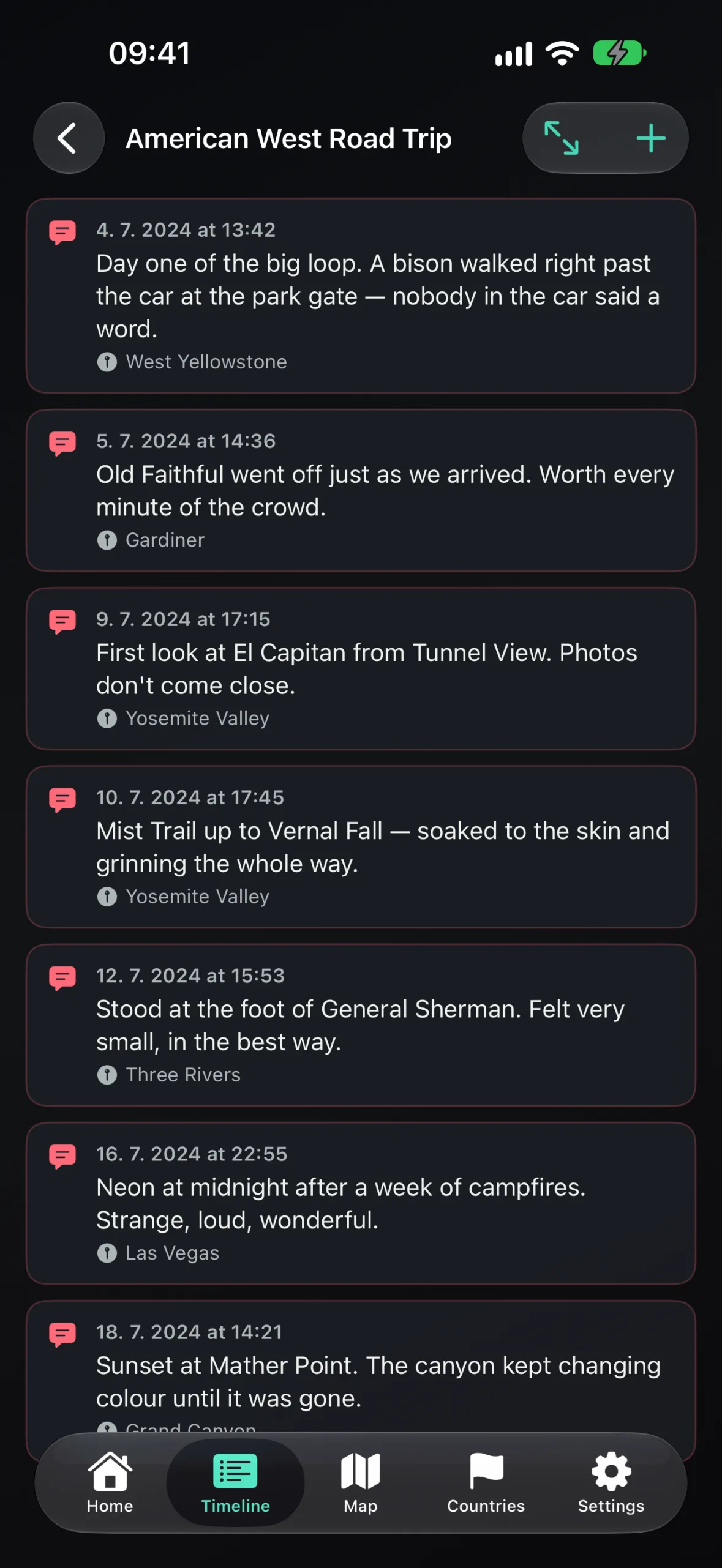
A note on AI-written stories, from any app: a model only knows what it's given. It can read that you were at the Grand Canyon at sunset; it can't know why the day mattered. Traviary's story writer is told to stick to the facts in your photos and log and never invent weather, moods or feelings — so the more you put in the Trip Log, the more the story sounds like you.
In Traviary: trips, maps and stats with no typing at all, plus a written story and cinematic Memories when you want them.
The “why” — the names, the jokes, the moment the car broke down. One dictated sentence a day is enough.
Question 3: where does the work happen?
To write about your trip, an app has to look at your photos and notes somewhere. Cloud-based apps upload them to their servers and run large AI models there. That can produce fluent prose, but it needs an account, a connection, and trust in what happens to a detailed record of where you live and travel.
On-device apps do the work on your phone. Traviary resolves places against a bundled database of 230,000+ cities and 115,000+ landmarks, builds trips, writes captions and stories with Apple's on-device models, and stores everything locally. There's no account and no Traviary server, and building your archive works in airplane mode. The trade-off is honest: on-device models are smaller than cloud ones, and the AI-written story needs an iPhone that supports Apple Intelligence.
Privacy by construction: nothing to leak, nothing to sign up for, and it works with no signal.
Accepting slightly plainer prose than a big cloud model might write — and no syncing between devices today.
At a glance
| Kind of app | Starts remembering | Produces | Runs | You still |
|---|---|---|---|---|
| GPS route tracker | The day you install it | Routes, a map, posts you write | Phone + their cloud | Keep it running; write the entries |
| Photo map / sorter | Your oldest photo | Photos grouped by trip and place | Usually on your phone | All of the writing |
| Cloud AI journal | Varies — often the trip you're on | Written entries from uploaded photos and notes | Their servers | Review the text; stay online |
| Traviary | Your oldest photo | Trips, maps, stats, a written story, Memories, print-ready PDFs | Entirely on your iPhone | Add a line to the Trip Log when it matters |
Which one fits you
- Want family to follow a trip live? Use a GPS tracker for that trip. (Our comparison with Polarsteps and Been goes deeper.)
- Want the most polished prose and don't mind uploading your photos? A cloud AI journal will suit you.
- Want every trip you've ever taken, written up and kept private on your phone? That's what Traviary is built for.
These aren't exclusive — plenty of people track one big trip live while Traviary quietly keeps the complete archive.
Where Traviary falls short
- It's iPhone-only (iOS 26), with no Android or web version.
- It can only rebuild places where you took a photo with location on. See how to fix gaps.
- No live sharing and no sync between devices — your archive lives on one iPhone and its backup.
- The AI-written story needs an iPhone with Apple Intelligence.
Questions people ask
Is there a travel journal app that writes itself?
Yes. Traviary builds your trips, maps and stats automatically from the photos on your iPhone, and its Travel Journal adds a story written on-device from your photos and your own Trip Log notes. Cloud-based apps can also write entries, but they upload your photos to do it.
Can an automatic travel journal include trips from years ago?
Only if it works from your photos. GPS trackers start recording the day you install them; Traviary reads the time and location already stored in your photo library, so it goes back as far as your oldest photo.
Do automatic travel journals upload my photos?
Many do — cloud AI journals send photos to their servers to write about them. Traviary doesn't: trips are built from photo timestamps, locations and favorites, the models that write captions and stories run on the iPhone, and nothing is uploaded.
